
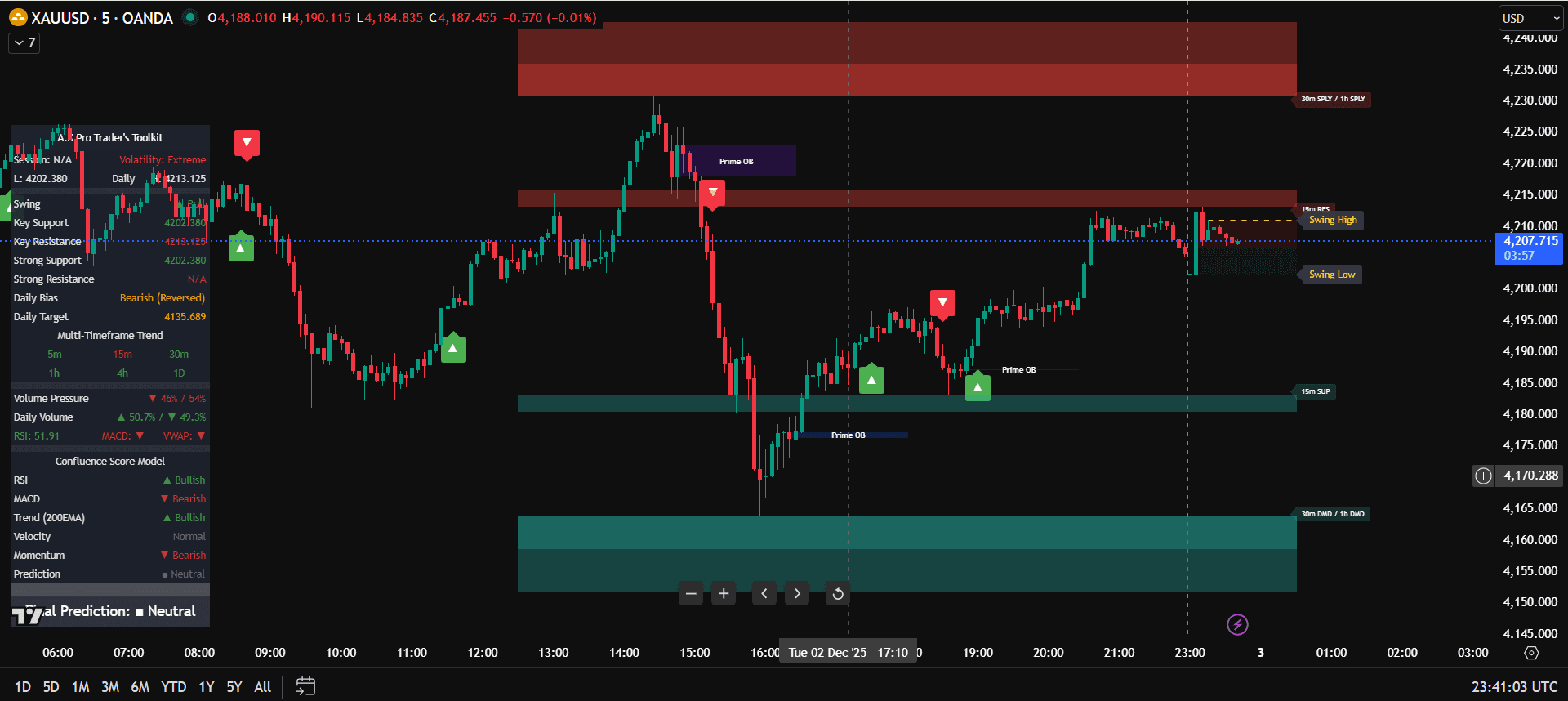
TradingView Indicator Setup for Beginners
How to use TradingView indicators starts with one simple rule: every indicator on your chart must have a job. Do not add tools just because they look impressive. A clean TradingView setup should help you read direction, mark important levels, confirm a trade idea, and manage risk before you enter.
The A.K Pro Trader's Toolkit gives traders a structured way to use TradingView indicators without turning the chart into noise. Instead of chasing every label or alert, use the Toolkit as a workflow: higher-timeframe bias first, key levels second, confirmation third, and risk control before every trade.
Quick answer: to use TradingView indicators properly, start with a clean chart, choose one trend tool, one key-level or structure tool, and one execution filter. Then wait for price to reach a meaningful area before using confirmation. The indicator supports the decision; it should not replace your trading plan.
If you are setting up the full workflow from scratch, start with our best TradingView indicators overview, then use this guide with the best TradingView indicators for beginners setup, the multi timeframe analysis forex strategy and the risk management trading strategy so your chart, levels and money-management rules all work together.
Supporting guides for this TradingView indicator workflow
Treat this page as the main hub for learning how to use TradingView indicators with the A.K Pro Traders Toolkit. The supporting guides below cover the beginner setup, checklist, strategy workflow, and simple explanation so traders can move from clean chart setup to risk-aware execution without indicator overload.
TradingView indicators without overload
Keep the chart clean and avoid duplicate signals.
TradingView indicators checklist
Review bias, levels, confirmation, alerts, stop-loss and risk.
TradingView indicators strategy
Turn the Toolkit setup into a repeatable trading workflow.
TradingView indicators explained
Understand what indicators do and why fewer tools work better.
Step-by-Step TradingView Indicator Setup
- Start with a blank chart: remove duplicate tools and keep only the indicators that help with trend, levels, confirmation, or risk.
- Choose your higher timeframe: use H4 or H1 to define the main direction before looking for lower-timeframe entries.
- Mark key levels: identify support, resistance, liquidity, or points of interest before looking for a signal.
- Add one execution filter: use rejection, BOS, CHOCH, displacement, or a clean retest before entering.
- Set alerts carefully: alerts should tell you when price reaches a plan, not make you react to every candle.
- Plan risk first: decide stop-loss, position size, and invalidation before you click buy or sell.
How the A.K Pro Trader's Toolkit Fits the Workflow
The Toolkit is not a simple buy-and-sell signal generator. It is a professional TradingView indicator environment built around top-down analysis, high-probability zones, and confluence. Your job is to use the information in the right order instead of treating every label as an entry.
1) Bias
Use higher-timeframe trend, dashboard context, and market direction to decide whether the trade idea is bullish, bearish, or unclear.
2) Location
Use support, resistance, key levels, liquidity, or points of interest to avoid entering in the middle of nowhere.
3) Confirmation
Wait for structure confirmation, rejection, displacement, or a retest before planning the entry and stop-loss.
Best Practice Rules for TradingView Indicators
- Do not stack duplicate indicators: if two tools answer the same question, keep the clearer one.
- Do not trade every alert: alerts should bring you back to the chart when price reaches a planned level.
- Do not ignore higher-timeframe bias: a lower-timeframe signal is weaker when H4 or H1 disagrees.
- Do not risk more because the chart looks perfect: position sizing stays fixed even on strong setups.
- Do not keep changing settings after one loss: review a sample of trades before changing the system.
Example TradingView Indicator Workflow for XAUUSD
A Gold trader can use TradingView indicators cleanly by starting with H4 or H1 direction, marking the nearest key level or liquidity zone, then waiting for M15 or M5 confirmation. The Toolkit helps organise that process, but the entry still needs a plan, a stop-loss, and a target before execution.
- Trend: check whether Gold is trending, ranging, or unclear on the higher timeframe.
- Level: wait for price to reach a support, resistance, liquidity, or POI area.
- Confirmation: use rejection, structure shift, displacement, or retest before entry.
- Risk: place the stop beyond invalidation and calculate position size before entering.
For Gold traders, connect this setup with the XAUUSD trading strategy and the Smart Money Concepts indicator guide so your TradingView layout, SMC structure, and risk model stay aligned.
Common Beginner Mistakes
Using indicators without context
A signal is weaker when it appears away from key levels, against higher-timeframe direction, or during unclear market structure.
Making the chart too busy
Too many labels, zones, and dashboards create confusion. A cleaner chart makes it easier to follow the plan.
Ignoring risk management
No TradingView indicator can protect the account if the stop-loss, lot size, and daily limit are wrong.
Changing rules too quickly
One losing trade does not mean the setup is broken. Track a group of trades before changing indicator settings.
FAQ: How to Use TradingView Indicators
How do I use TradingView indicators as a beginner?
Start with a clean chart, use one indicator for trend, one for levels or structure, and one for confirmation. Avoid adding tools that duplicate the same signal.
How many TradingView indicators should I use?
Most beginners should use two or three indicators maximum. More indicators often create conflicting signals and late decisions.
Are TradingView indicators buy and sell signals?
No. Indicators should support a plan. You still need higher-timeframe context, key levels, confirmation, stop-loss placement, and fixed risk.
What is the best TradingView indicator setup for XAUUSD?
A clean XAUUSD setup uses H4 or H1 bias, key levels or SMC structure, one execution confirmation tool, and a position size plan before entry.
After setting up the Toolkit, the cleanest next step is to connect it with the SMC indicator settings and workflow page, then apply the same chart layout inside the smart money concepts gold trading guide and the complete XAUUSD trading strategy.
This guide is for educational and informational purposes only and does not constitute financial, investment or trading advice. Trading leveraged products involves risk. Always use appropriate risk management and make your own trading decisions.
Related links
Continue your learning with the most relevant indicator overview and plan options.
General Risk Disclaimer
All A.K Pro Traders content and indicators are provided for educational and informational purposes only and do not constitute financial, investment or trading advice. Trading leveraged products such as forex, indices, commodities and crypto involves substantial risk. Always perform your own research, use appropriate risk management and consider speaking with a licensed financial professional before making any trading or investment decisions.