
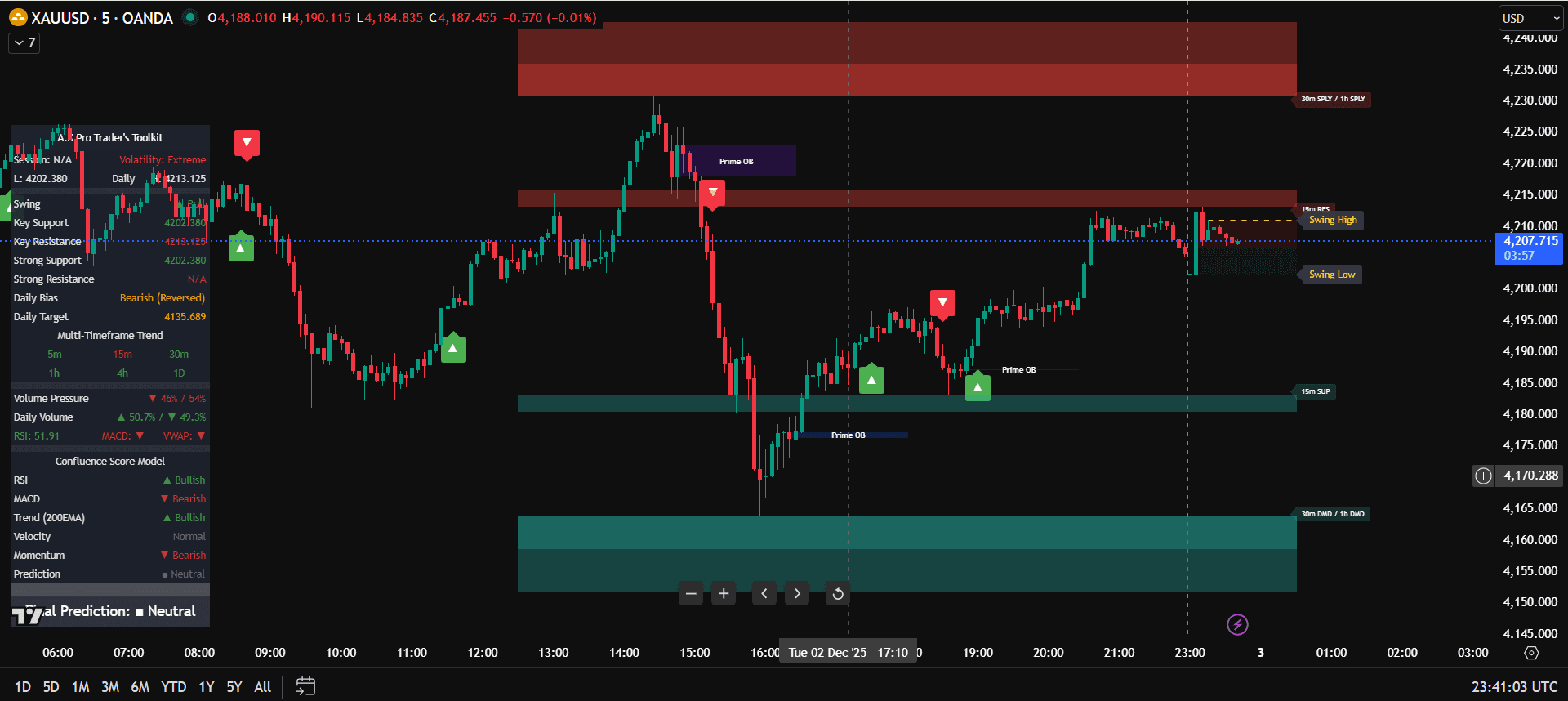
Best TradingView Indicators for Beginners Without Chart Overload
The TradingView indicators for beginners that matter most are not the ones that fill every corner of the chart. A clean setup should help you answer three simple questions: what is the higher-timeframe direction, where are the important levels, and is the current trade idea worth the risk?
Many traders add RSI, MACD, moving averages, volume tools, trend dashboards, support and resistance scripts, and multiple signal systems until the chart becomes impossible to read. That creates analysis paralysis. The better approach is to give each indicator a clear job and remove anything that repeats the same information. If you need the full setup process, use the how to use TradingView indicators guide before adding more tools.
Quick answer: beginners should use a simple TradingView indicator setup with one trend tool, one structure or key-level tool, and one execution filter. For Gold traders, connect that setup to a structured XAUUSD trading strategy instead of taking every signal on the chart.
Why too many TradingView indicators hurt beginners
Indicator overload happens when every tool is competing for your attention. One script says buy, another says sell, a third marks ten levels, and the trader ends up reacting instead of following a plan. More indicators do not automatically create more edge.
- Duplicate signals: several tools may measure the same momentum or trend.
- Late entries: traders wait for too many confirmations and enter after the move.
- Conflicting rules: one indicator supports the trade while another blocks it.
- Messy charts: too many labels, zones, and colours make structure harder to see.
A clean TradingView setup should reduce decisions, not add more. The chart needs enough information to build confidence, but not so much that every candle becomes a debate.
Best TradingView indicators for a clean beginner setup
A beginner-friendly TradingView indicator setup works best when every tool has a specific role. Instead of stacking five tools that all show trend, choose one main framework and use the rest only for confirmation.
1) Trend direction
Use one trend tool to understand whether price is generally bullish, bearish, or mixed. This can be a moving average, dashboard, or toolkit trend reading.
2) Key levels and structure
Use support, resistance, market structure, or Smart Money Concepts levels to know where price may react instead of entering in the middle of nowhere.
3) Execution filter
Use one final filter for confirmation, such as a structure shift, rejection candle, confluence score, or clean retest after price reaches a key area.
Simple TradingView indicator setup for beginners
The simplest setup is a top-down workflow. Start on the higher timeframe, then move down to the execution timeframe only after the direction and important zones are clear.
- Higher timeframe: check H4 or H1 to define trend and major levels.
- Trading area: mark the most important support, resistance, liquidity, or POI.
- Execution timeframe: use M15 or M5 only after price reaches a meaningful area.
- Confirmation: wait for rejection, structure shift, or confluence before entry.
- Risk: decide stop-loss and position size before clicking buy or sell.
This keeps the indicator setup clean because each timeframe has a job. The higher timeframe gives context, the key levels define location, and the lower timeframe handles timing.
Best TradingView indicator setup for XAUUSD
XAUUSD moves fast, so Gold traders need a cleaner setup than most markets. A good TradingView indicator setup for XAUUSD should highlight trend, liquidity, key levels, and risk without hiding the candles.
- Use H4/H1 to identify bias before London or New York starts.
- Mark important levels such as prior highs, lows, support, resistance, and liquidity.
- Use SMC or structure tools only to support the trade idea, not replace judgement.
- Keep risk visible by planning stop-loss and position size before entry.
If your main market is Gold, keep this page as the chart setup guide and use the complete XAUUSD trading strategy as the full execution framework for timing, liquidity, sessions, and risk.
How to avoid indicator overload on TradingView
The cleanest rule is simple: if an indicator does not change your decision, remove it. A beginner does not need ten tools. You need a repeatable process that can be followed under pressure.
- Limit the chart to one trend tool, one level or structure tool, and one confirmation tool.
- Remove duplicate oscillators that all say the same thing in different colours.
- Create one layout for higher-timeframe analysis and one layout for execution.
- Keep alerts selective so you are not reacting to every small market movement.
- Review losing trades to see whether the issue was the indicator, the setup, or the risk.
Common mistakes beginners make with TradingView indicators
Using indicators as signals only
A signal without context is weak. Trend, location, session timing, and risk still matter.
Changing settings after every loss
One losing trade does not mean the setup is broken. Review a sample of trades before changing rules.
Ignoring higher-timeframe context
A lower-timeframe buy signal is weaker if H4 or H1 structure is clearly bearish.
Forgetting risk management
Even the best TradingView indicators for beginners cannot protect an account if lot size is too large.
Example TradingView indicator setups for beginners
Examples make a clean chart easier to understand. The goal is not to copy every setting, but to see how each indicator has one job. If two tools answer the same question, remove the weaker one and keep the chart readable.
Example 1: Clean XAUUSD beginner setup
A Gold trader checks H1 direction first, marks the main liquidity or key level, then waits for M15 confirmation before entry. The chart uses one trend reading, one key-level or SMC tool, and one confirmation rule. This keeps the setup focused on the trade plan, not random signals.
- Trend role: H1 or H4 bias shows whether Gold is bullish, bearish, or mixed.
- Location role: key levels, liquidity, or structure show where price may react.
- Execution role: M15/M5 confirmation decides whether the trade is worth taking.
Example 2: Clean forex or index setup
A forex or index trader can use the same idea without overloading the screen. Use a higher timeframe for trend, mark the nearest support or resistance, then wait for price to reach that area before using the execution filter.
- Before entry: ask whether price is at a meaningful level.
- During entry: use one confirmation rule instead of five competing signals.
- After entry: manage risk from the chart structure, not emotion.
Edge cases: when TradingView indicators fail beginners
Even a clean TradingView indicator setup can fail if the market condition is poor. These edge cases help beginners avoid blaming the tool when the real issue is timing, volatility, risk, or unclear structure.
The signal appears in the middle of a range
If price is trapped between support and resistance, a signal may have no room to move. Wait for a break, a sweep, or a reaction from a cleaner level.
News volatility makes the chart unreadable
High-impact news can create fast spikes and false signals. Beginners should reduce size, wait for spreads to settle, or skip the setup until structure is clearer.
The lower timeframe fights the higher timeframe
A small buy signal is weaker if H4 or H1 is clearly bearish. Use higher-timeframe direction as the filter before trusting lower-timeframe confirmation.
The stop-loss is too wide for the account
If the correct stop makes the trade too risky, do not tighten the stop to force the setup. Reduce position size or skip the trade.
Clean TradingView indicator checklist
- The chart has one clear trend or bias tool.
- Important levels, liquidity, or structure are visible without clutter.
- There is one execution filter, not five conflicting entry signals.
- The setup matches the higher-timeframe direction or has a clear reversal reason.
- The stop-loss and position size are planned before entry.
- The trade is skipped if news, spread, or volatility makes the setup unclear.
This is the difference between using TradingView indicators like a beginner and using them like a process. The indicators should help you see the chart clearly, then your rules decide whether the trade is valid.
FAQ: Best TradingView indicators for beginners
What are the best TradingView indicators for beginners?
The best TradingView indicators for beginners are simple tools that define trend, important levels, and confirmation without cluttering the chart. Avoid stacking several tools that all measure the same thing.
How many indicators should I use on TradingView?
Most beginners should use two or three indicators maximum: one for trend, one for key levels or structure, and one for confirmation. More than that often creates confusion.
Why do too many indicators cause bad trades?
Too many indicators cause bad trades because they create conflicting signals, late entries, and analysis paralysis. A clean chart makes it easier to follow a written plan.
What is the best TradingView setup for XAUUSD?
A clean XAUUSD setup uses higher-timeframe bias, key levels or liquidity, one execution confirmation tool, and fixed risk. Gold traders should avoid clutter because XAUUSD moves quickly during London and New York.
Are TradingView indicators enough to trade profitably?
No. TradingView indicators can support analysis, but traders still need a clear strategy, risk management, session awareness, and discipline before entering trades.
How do I avoid indicator overload on TradingView?
Avoid indicator overload by removing duplicate tools, assigning one job to each indicator, using separate analysis and execution layouts, and keeping risk rules visible before every trade.
Why do TradingView indicators fail for beginners?
Indicators often fail beginners when they are used as standalone signals. A signal is weaker when higher-timeframe context, key levels, volatility, and risk management are ignored.
What is a good beginner indicator setup for Gold?
A good beginner setup for Gold uses H4 or H1 bias, one key-level or liquidity tool, one execution confirmation rule, and fixed risk. This is cleaner than reacting to every alert.
All A.K Pro Traders content and indicators are provided for educational and informational purposes only and do not constitute financial, investment or trading advice. Trading leveraged products such as forex, indices, commodities and crypto involves substantial risk. Always use appropriate risk management and make your own trading decisions.
Related links
Continue your learning with the most relevant indicator overview and plan options.
General Risk Disclaimer
All A.K Pro Traders content and indicators are provided for educational and informational purposes only and do not constitute financial, investment or trading advice. Trading leveraged products such as forex, indices, commodities and crypto involves substantial risk. Always perform your own research, use appropriate risk management and consider speaking with a licensed financial professional before making any trading or investment decisions.